" height="8px" id="x_HOY8XyM" transform="translate(6.008 4)" width="4.015649999999994px"/></svg>)
" height="7.5px" id="CSiwjDzLM" transform="translate(5 4)" width="6.570300102233887px"/></svg>)
" height="5.684156997170297px" id="FuNtYuhE0" transform="translate(4 5.16)" width="8px"/></svg>)
" height="8px" id="MlOPP20GY" transform="translate(4 4)" width="8px"/></svg>)

Giving a pet regular medications—whether for chronic illness, prevention, post-surgery recovery, or simply supplemental care—can become complicated. It’s easy to miss a dose, forget refills, or lose track of who gave what, when. The PetDesk mobile app was created to simplify this process and keep your pet’s health organized in one place.
Let’s walk through what’s new, getting the most out of the app, and how medication management fits into your larger pet-health routine.
Why medication tracking matters for pets
Many veterinary conditions now require long-term medication (e.g., arthritis, thyroid disease, heart disease, epilepsy) or a schedule of preventive treatments (e.g., heartworm, flea/tick).
Missing a dose or delay can reduce the effectiveness of treatment, increase risk of relapse or complications, and raise costs of care.
Keeping all pet health data in one place (medications + appointments + records) helps you, your vet and any caregivers stay aligned.
As pets age, medication regimens tend to increase (multiple meds, supplements, veterinary check-ins), so a reliable system becomes essential.
What’s new in PetDesk
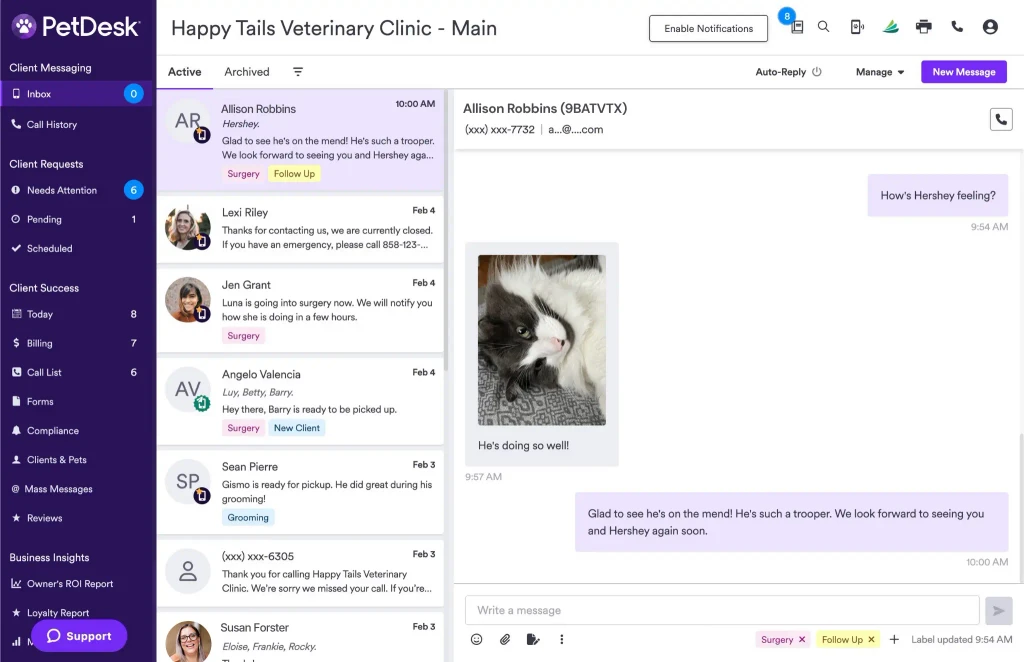
Integration with veterinary practices: The app links to clinics, shows providers, and sends reminders/refill requests.
Calendar sync: To-do items and reminders can be synced with your own smartphone calendar so you don’t only solely rely on app alerts.
Medication refills & requests: You can request refills via the app, which simplifies communication with your vet.
Multiple pets, multiple regimens: The app supports profiles for multiple pets and different medication schedules under each.
Enhanced reminders & notifications: Intelligent reminder logic (e.g., recurring doses, notifications to others, history/track of completed medication tasks).
Better user experience: Improved interface, syncing, and task tracking.
Rather than a simple “reminder” tool—you can use the petDesk app as a core piece of your pet’s medication management ecosystem.
How to set up medication tracking in PetDesk
Here’s a suggested workflow for getting your pet’s medication regimen properly logged and managed in PetDesk:
Create or update your pet’s profile
Ensure each pet has a profile in PetDesk with the correct name, species, breed, age, weight, and vet clinic connected.
If the vet is registered on PetDesk, link the clinic so medication records and refill requests can flow.
Enter each medication
For each prescribed medication: name, dosage, start date, frequency (e.g., twice daily, every 12 hours), administration route (oral, topical, injection) and prescription end date (if any).
Include preventive medications (heartworm, flea/tick) as “medication tasks” so you don’t overlook them.
Set up reminders and calendar sync
Use PetDesk to schedule reminders at the correct time(s) of day.
If you wish, enable calendar-sync so these reminders show in your regular phone calendar too.
Consider setting secondary reminders (for example, one alert on your phone and one alert via email).
Log and track completion
When you administer a dose, mark it as complete. This creates a history which you can review (useful at vet visits).
If a dose is missed, log that too to help your vet stay in the know.
Request refills efficiently
When supply is low, open the PetDesk medication/request section and send a refill request without playing phone-tag with your vet.
Set a “refill due” reminder 3 to 5 days before running out to give time for vet review, pharmacy processing, and pickup/delivery.
Review monthly/quarterly
Once a month (or at each vet check), review the medication list to see if any are still active, discontinued, or have new instructions.
Remove outdated medications or mark them as inactive so the schedule stays clean.
Check for interactions (especially if pets are added to new meds) and update the app accordingly.
Tips for supporting your pet’s health
Consistent timing: For chronic conditions, try to give medications at the same time(s) daily—this helps habit formation for you and predictable coverage for your pet.
Try linking behaviors: Pair medication time with another routine (e.g., meal, walk, bedtime) so it becomes habitual.
Use the “To-Do” list in the app not just for the medication itself but for associated care tasks (e.g., “weigh pet weekly”, “check blood pressure”, “log side-effects”).
Set “extra” reminders for when someone else may need to give the dose (e.g., if pet care is split across household members).
Maintain a medication log: Keep a short note of unusual symptoms, missed doses, and responses.
Combine with physical backups: If you lose your phone/tablet, ensure the vet clinic layout, refill name, and dose information is stored in a paper or cloud backup.
Notifications management: Make sure your PetDesk push notifications are turned on in your device settings so you don’t miss an alert for your pet.
Education: For each medication, understand the ‘why’—such as the expected outcomes and potential side-effects—to stay on top of any issues.
Situations where extra care is needed
Multiple medications: If your pet is on 3+ meds per day (especially different timings), devoting time to review the schedule is critical.
Short-term complex regimens: Post-surgery or for certain conditions the schedule may change often—use PetDesk to schedule transitional reminders (dose tapering, stop date) and deactivate once done.
Medication changes or substitutions: Whenever the vet changes a dose/formulation, ensure you update the app immediately so old reminders don’t cause confusion.
Traveling pet owners/caregivers: If you are away or another person is giving the meds, ensure they have access to PetDesk and understand how to log doses.
Veterinary monitoring: Some medications require lab testing or monitoring (e.g., thyroid meds, kidney disease drugs). Use PetDesk to schedule not only medication reminders, but associated lab/visit reminders.
Missed doses: If you notice multiple missed doses, use the log/history to prepare for a discussion with your vet.
Medication adherence is key for your pet’s health. The PetDesk app is a strong partner in organizing, reminding, logging, and requesting refills—but only if used consistently and updated.
Following a structured setup, reviewing regularly, and integrating medication management into your routine will help you:
Reduce missed doses & treatment failure
Simplify communications with your veterinary clinic
Keep better records that support improved care
Reduce stress (for you, your pet, and your vet)
Everything your pet needs—right in your pocket
Access records, set reminders, and manage care effortlessly, all for free.