
veterinary operations guide
The Official CSR Survival Guide
Helpful hints, tips, and ideas to support veterinary front desk superstars
Pet ownership continues to rise, with research showing that approximately 71% of U.S. households now own pets.1 Meanwhile, veterinary practices across the country face ongoing staffing shortages and persistent burnout among veterinary professionals.
No team feels this pressure more than customer service representatives (CSRs). CSRs are the front line of the practice—handling early morning voicemails, nonstop phone calls, scheduling challenges, client concerns, medical updates, payment conversations, and coordination with every clinical team in the building.
Client touchpoints have doubled or tripled in recent years, while staffing levels have not kept pace. As a result, strong, efficient communication workflows and digital support tools have become more essential than ever before.
This guide provides:
- Practical tips to simplify CSR tasks
- Digital tools that reduce workload
- Strategies to improve client communication and satisfaction
- Ways to strengthen operational efficiency across the entire appointment lifecycle
The goal is simple: empower CSRs to work smarter so clients feel cared for, patients receive great support, and staff experience less stress.
Work smarter at the front desk
Digital channels to know and prioritize
Optimizing in-clinic appointments
Go directly to the information you are interested in by clicking the box above
Three things to prioritize to work smarter at the front desk
1. Gather complete contact information
Accurate contact information is the foundation for all efficient client communication. Without mobile numbers and emails, CSRs get trapped in time-consuming voicemail loops and unnecessary phone tag.
Make it standard protocol to collect:
- Primary mobile phone number
- Email address
- Additional contacts, if applicable
Modern tools depend on this information. For example:
- Online booking tools such as PetDesk Direct Booking automatically send confirmations, reminders, and pre-visit instructions via text and email.
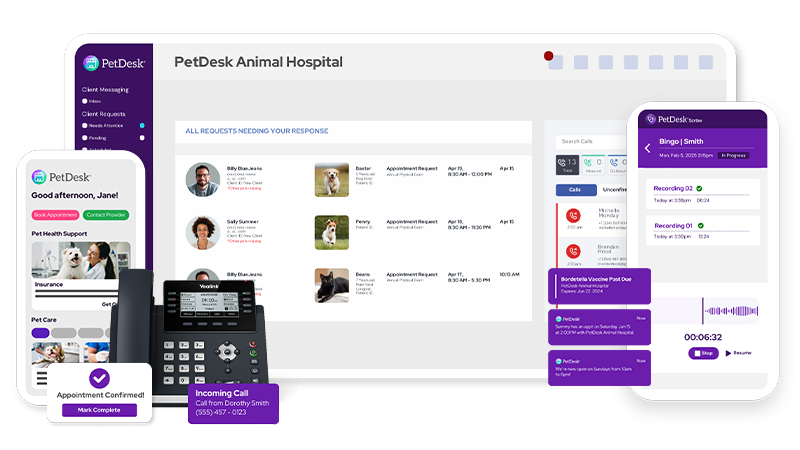
- Veterinary phone systems like PetDesk Phones use accurate phone numbers to pull up client and patient information automatically when calls come in.
Educate clients on why this matters, including:
- Faster updates about their pet
- Appointment reminders
- Safety alerts
- Educational materials
- Promotions or important announcements
- Efficient two-way communication
Clients don’t always understand the operational benefits, so CSRs must communicate them.
2. Focus on the client experience
Improving the client experience ultimately reduces your team’s workload.
When clients can self-serve by booking appointments through direct online booking software, review instructions on your custom veterinary website, or receive reminders automatically, they rely less on front-desk staff. Every piece of clarity you provide up early on saves multiple follow-up calls later.
Key elements that shape a strong client experience:
- Greeting clients and pets by name
- Identifying clients quickly (appearance, pet breed, or booking details)
- Exhibiting patience and empathy
- Observing emotional cues and body language
- Keeping the lobby clean and calm
- Making genuine, warm connections beyond the basics
Complement these interpersonal skills with digital convenience. When clients understand your workflows and have alternative communication paths (online scheduling or booking, texting, automated updates), they feel informed and supported.
3. Choose the right communication channel
Clients rarely think about the communication channel—only whether the method is convenient for them. CSRs must determine the best channel for each type of communication.
Use texting, email, phone, and in-app tools strategically:
- Text: Quick updates, logistics, routine questions, non-sensitive info
- Email: Detailed documents, summaries, resources, mass messages
- Phone: Sensitive discussions, escalations, financial questions, emotional conversations
- Self-service tools: Routine scheduling via online booking software
Veterinary-specific phone systems that sync with your PIMS enhance your ability to triage calls quickly by showing client details as soon as the phone rings. This helps CSRs determine whether a conversation should continue by phone, or transition to text or email.
Every call or message should be directed to the most efficient channel—not the most familiar one.
Digital channels:
what to know
Modern veterinary communication blends human connection with digital efficiency.
Below are the core digital channels CSRs should master.
Two-way texting
Two-way texting is now widely used across veterinary hospitals to simplify logistics and improve real-time coordination. It’s ideal for quick, straightforward communication.
Why texting works:
- Clients and staff can respond when time allows
- Reduces interruptions
- Minimizes hold times
- Shortens front-desk bottlenecks
- Improves clarity
- Reduces phone traffic and voicemail volume
Uses:
- Notify clients their room is ready
- Share negative or routine test results
- Send surgery or dental photos
- Reschedule appointments
- Text invoices or payment links
- Triage non-urgent questions
- Ask for quick status updates on medications or symptoms
Tips:
- Verify the correct mobile number
- Keep messages clear and friendly
- Proofread before sending
- Use templates to save time
- Stay concise—readability matters
- Set expectations on what info you need back
Texting pairs seamlessly with online booking software like PetDesk Direct Booking and supports the workflows that veterinary-specific phone systems, such as PetDesk Phones, help manage.
Email remains a strong channel for long-form content, educational materials, and mass outreach.
Uses:
- Discharge instructions
- Disease or medication handouts
- Financial or insurance resources
- Receipts
- Seasonal reminders or promotions
- Targeted messaging campaigns
Mass messaging (available through PetDesk Communications) allows you to segment audiences and track performance, making email more impactful.
Tips:
- Use professional, branded signatures
- Personalize when possible
- Keep attachments and downloads simple
- Craft specific, compelling subject lines
- Do not expect immediate responses
- Tell clients if you require action
Integrating online booking software
Direct online booking software is a core tool for reducing CSR workload. It enables pet parents to schedule routine appointments online without needing to call the practice.
Benefits:
- Reduces inbound scheduling calls
- Eliminates scheduling back-and-forth
- Increases appointment accuracy
- Automates confirmations and reminders
- Prepares clients with visit instructions and forms
- Fills gaps in the schedule with real-time availability
When to recommend it to clients:
- Wellness appointments
- Vaccine boosters
- Follow-ups
- Progress exams
- Technician appointments (as appropriate)
CSRs should direct clients to book routine appointments online whenever possible to reserve phone capacity for complex or urgent needs.
Integrating veterinary-specific phone systems
Veterinary-specific phone systems transform the call-handling experience by giving CSRs context instantly.
As soon as the phone rings, you’ll see:
- Client name
- Patient name(s)
- Appointment history
- Reminders due
- Communication history
- Key notes
Benefits:
- Faster, more accurate call handling
- Reduced time searching the PIMS
- Easier triage for call urgency
- Consistent client recognition
- More personalized interactions
- Shorter hold times
- Reduced caller frustration
Optimizing in-clinic appointments
Each stage of the appointment lifecycle—before, during, and after—offers opportunities to reduce bottlenecks and improve communication.
Before the appointment
Set expectations early
Create a “What to Expect During Your Visit” section on your website. Include:
- Arrival and check-in instructions
- Parking guidance
- Required forms or documents
- Medication refill timelines
- Payment expectations
- Drop-off availability
- Estimated time in the clinic
Pin key instructions on your social channels. CSRs can send links via text to reduce repeated conversations.
Digital forms
Use digital veterinary forms for:
- Patient history updates
- Behavior/handling notes
- Pre-anesthetic screening
- Consent forms
- Medication/diet details
Send your forms by text for the highest completion rate. Software like PetDesk Direct Booking can embed forms into scheduling flows automatically.
Mobile-friendly instructions
Send a “day-of” appointment reminder with:
- Appointment time
- Check-in steps
- Items to bring
- Early arrival policy
- Any required fasting
- Parking instructions
This reduces confusion and minimizes last-minute questions.
During the appointment
Choose the right communication channel
Provide updates based on client preference:
- Text updates for wait times or diagnostics
- Emails for treatment plans or estimates
- Phone calls for sensitive discussions
- Photos/videos when appropriate
This hybrid model keeps clients informed without overloading the front desk.
Standardize internal workflows
Support CSRs and technicians with consistent processes:
- Intake question checklists
- Treatment and communication templates
- Status notifications (checked in → exam → doctor → discharge)
- A unified messaging platform to reduce back-and-forth
PetDesk Phones helps prevent a chaotic call flow by providing immediate context when pet parents call back for updates.
After the appointment
Test results
- Negative/routine results → text or email
- Sensitive results → phone call
- Avoid voicemail tag by texting the client to request a call time
Progress checks
Automated or semi-automated options include:
- Day-after medication follow-ups
- Three-day symptom checks
- Photo requests for wounds or dermatology
- Chronic disease monitoring questionnaires
- Automatic reminders for rechecks
This reduces inbound questions and improves patient outcomes.
Strategic considerations
for your practice
To keep client communication efficient and sustainable:
Operational bandwidth: Track cycle-time metrics to reveal bottlenecks.
Generational preferences: Offer both phone and digital channels, but default to text/email when appropriate.
Client education: Teach clients how to use online booking, texting, and reminders during onboarding.
Automation and integration: Ensure texting, reminders, booking, and PIMS sync seamlessly.
Recommended next steps:
- Audit current communication workflows
- Promote PetDesk Direct Booking for all routine visits
- Implement PetDesk Phones for faster, more contextual call handling
- Update your website with a clear visit walkthrough
- Create mobile-friendly digital forms
- Standardize messaging templates across email, text, and phone
- Pilot expanded digital follow-ups (start with surgeries or dermatology)
- Train CSRs and technicians on choosing the right channel
- Develop internal rules for when to text vs. call
- Track key metrics to measure improvements
Proudly brought to you by PetDesk
PetDesk provides modern clinics with the most so veterinary teams can stress the least.
- Pet parent mobile app
- Auto reminders & confirmations
- Digital payments
- Texting & mass messaging
- Client loyalty programs
- Easy-to-use digital forms
- PIMS-integrated phones
- Voice features & call routing
- 24/7 direct booking
- AI-powered SOAP notes
- Custom-built websites
- Digital marketing