" height="8px" id="x_HOY8XyM" transform="translate(6.008 4)" width="4.015649999999994px"/></svg>)
" height="7.5px" id="CSiwjDzLM" transform="translate(5 4)" width="6.570300102233887px"/></svg>)
" height="5.684156997170297px" id="FuNtYuhE0" transform="translate(4 5.16)" width="8px"/></svg>)
" height="8px" id="MlOPP20GY" transform="translate(4 4)" width="8px"/></svg>)

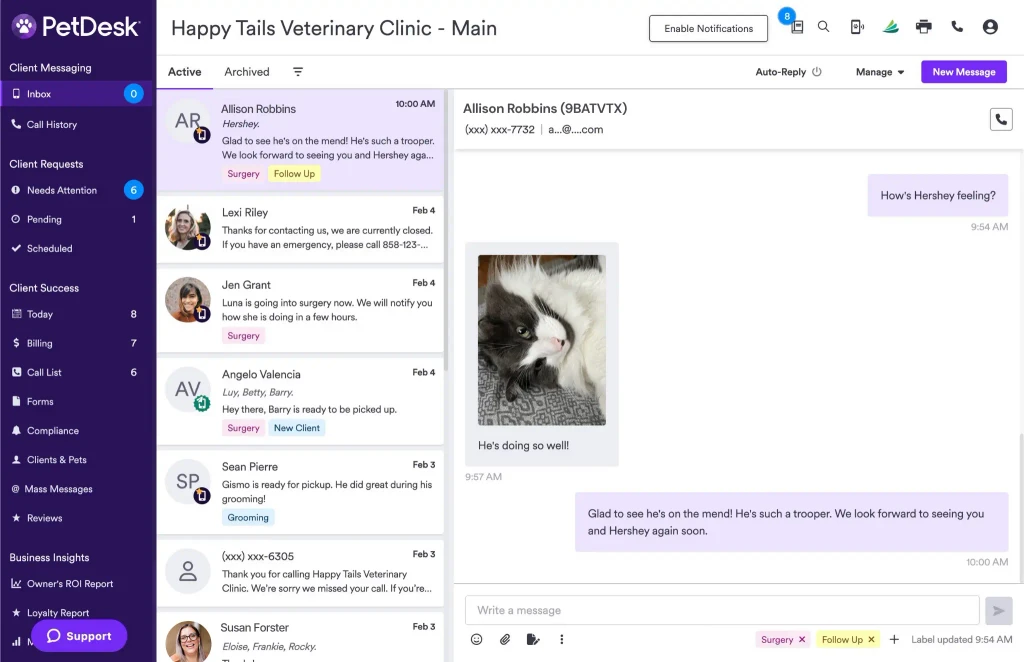
Between phone calls, text messages, voicemails, and follow-ups, veterinary professionals like you spend too much time juggling multiple systems. But it doesn’t have to be that way any longer! PetDesk Phones is now fully integrated into PetDesk Communications, bringing all veterinary customer communication into one centralized workspace.
Calls, texts, transcripts, and AI-powered summaries now live in a single interface, so your team can focus less on switching screens and more on delivering great care. We’re covering all the exciting features about our new PetDesk Phones and PetDesk Communications integration to help you further simplify your clinic and strengthen your care.
1. Know who’s calling before you pick up, every time
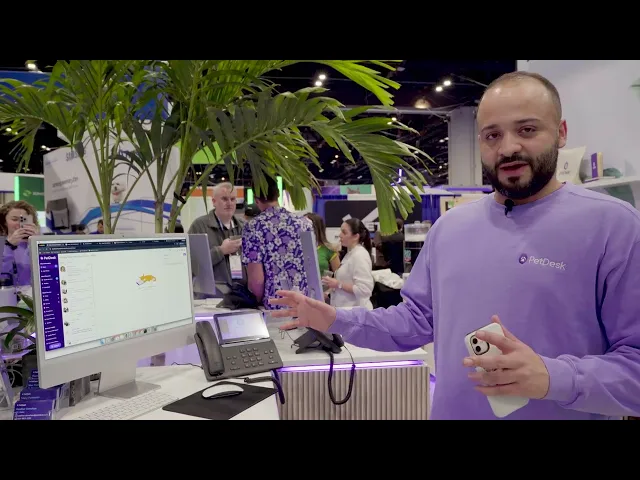
Picture this: you’re texting a client when suddenly a call comes in. Before you even pick up, a complete caller profile—pulled directly from your PIMS and displayed within PetDesk Communications—pops up on the screen. You quickly see that the caller is "Allison Robbins," whose cat Hershey is due for a vaccine next week. This immediate context allows you and your front desk team to skip repetitive questions and confidently answer the call: "Hi Allison, are you calling about Hershey's annual exam and rabies vaccine appointment next week?" The conversation instantly becomes more personalized and productive, cutting down on phone hold time and improving the client experience.
2. Get smart, AI-generated call summaries
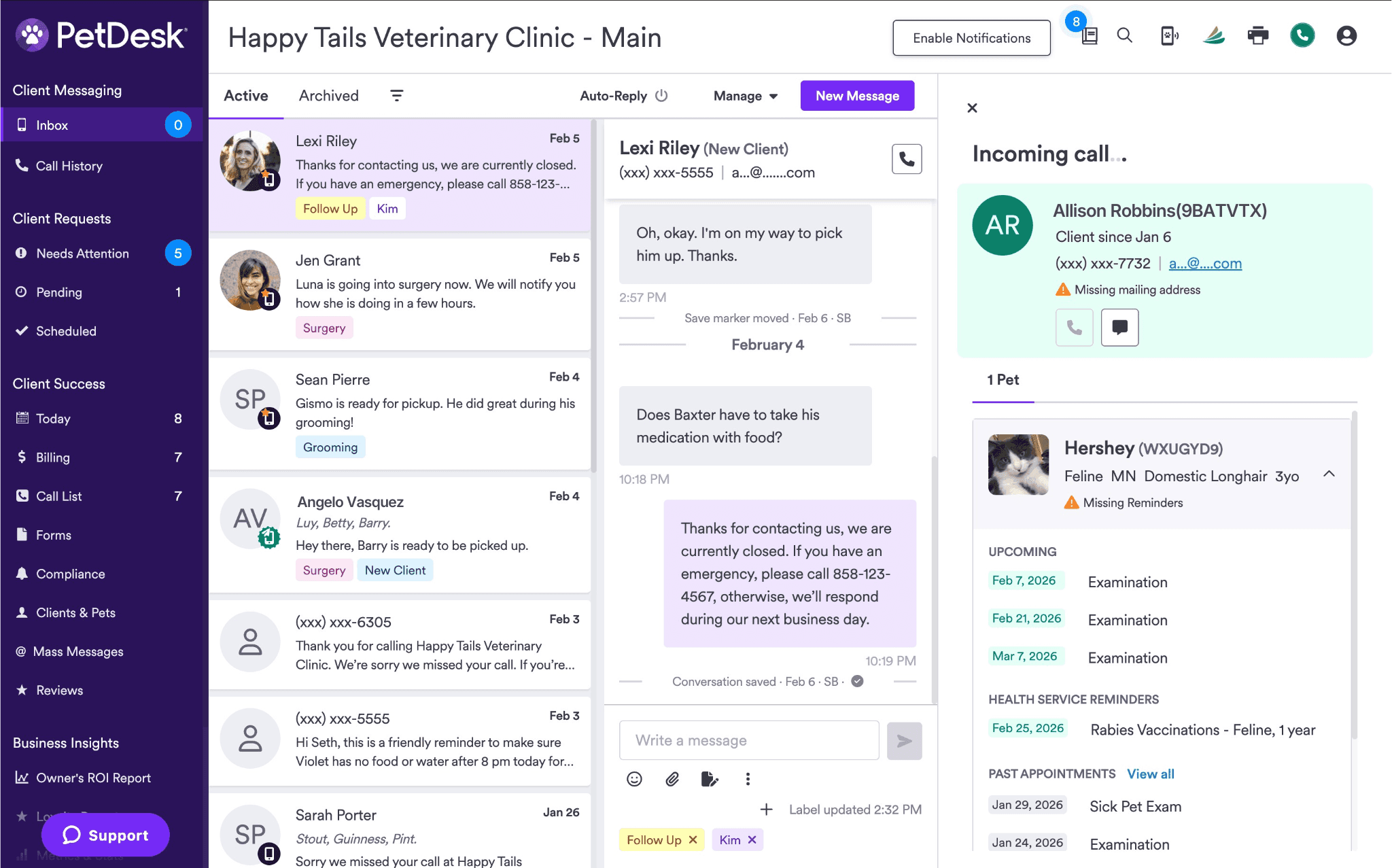
The following week at your clinic, a vet tech sees a recent missed call from Allison. They immediately see the AI-generated summary from the voicemail asking how long it will take for Hershey to be fully protected after his rabies vaccination. The tech easily reviews the summary and syncs it to your PIMS, ensuring everyone has accurate, up-to-date information for the upcoming visit—all without having to listen to the voicemail or read the full transcript.
3. Reach out to pet parents with a single click
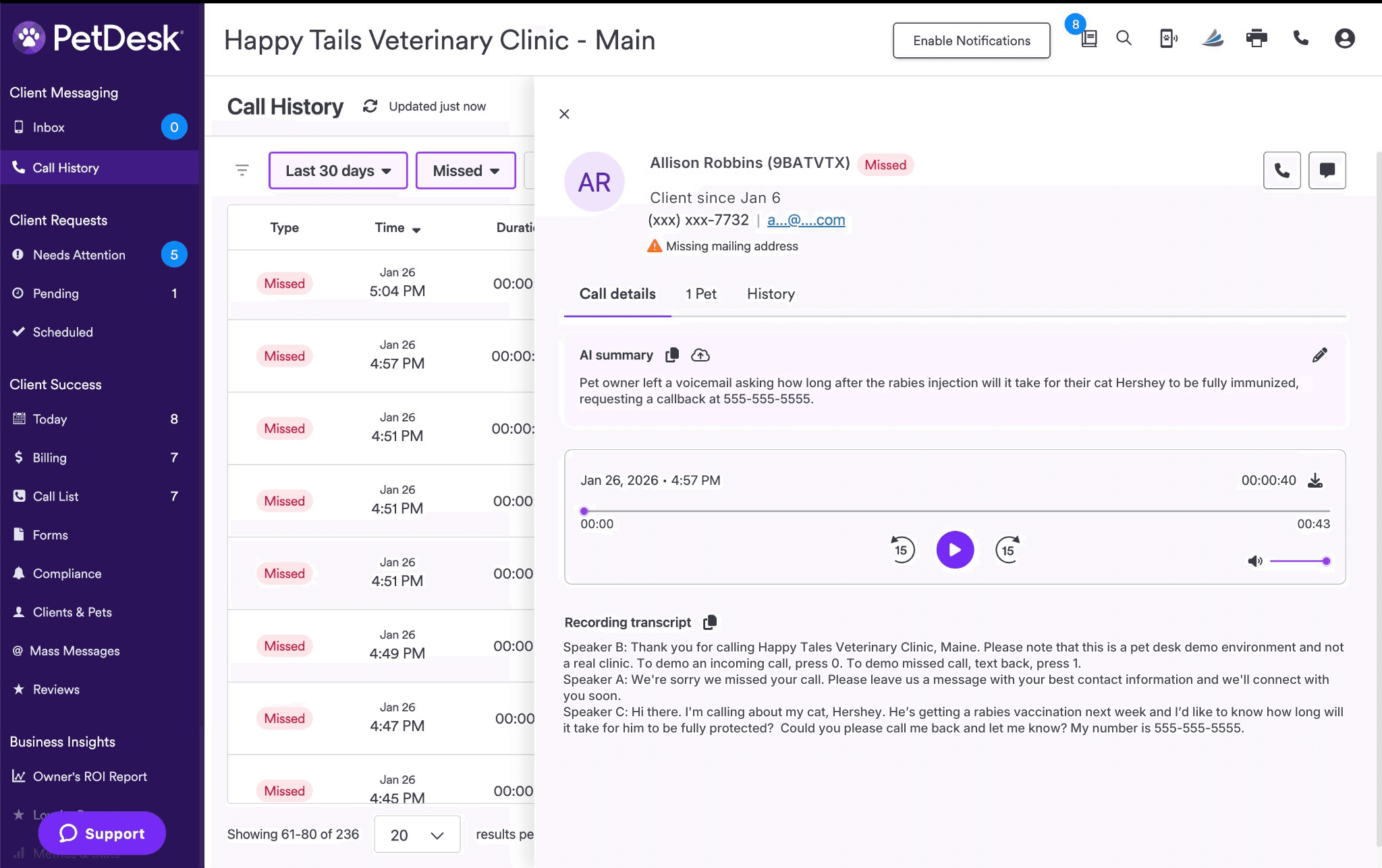
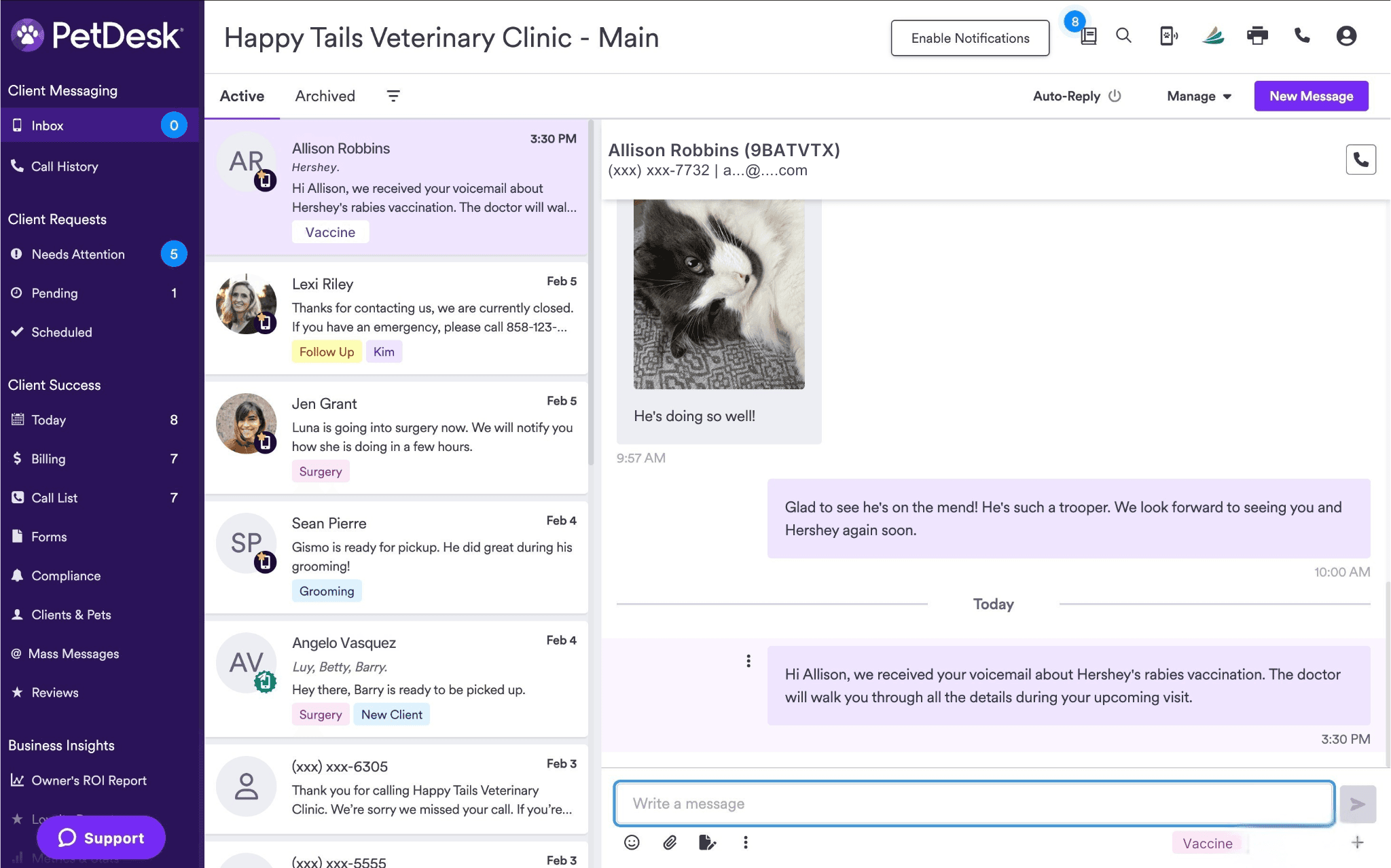
During another busy day at the clinic later that month, a front desk customer service representative notices a missed call from Allison. Not to worry—the CSR is able to initiate a call or text to Allison right from her client profile, with just one click. The call goes to Allison’s voicemail, but the CSR knows this won’t become a daunting game of phone tag: instead, the CSR simply clicks the Two-Way Texting Inbox. From there, they’re able to use pre-loaded templates for quick communication, label conversations for easy retrieval, and sync messages directly back to the PIMS. Allison, on her own time without calling the clinic, thanks the CSR for getting back to her so quickly.
4. Access your complete call history in one view
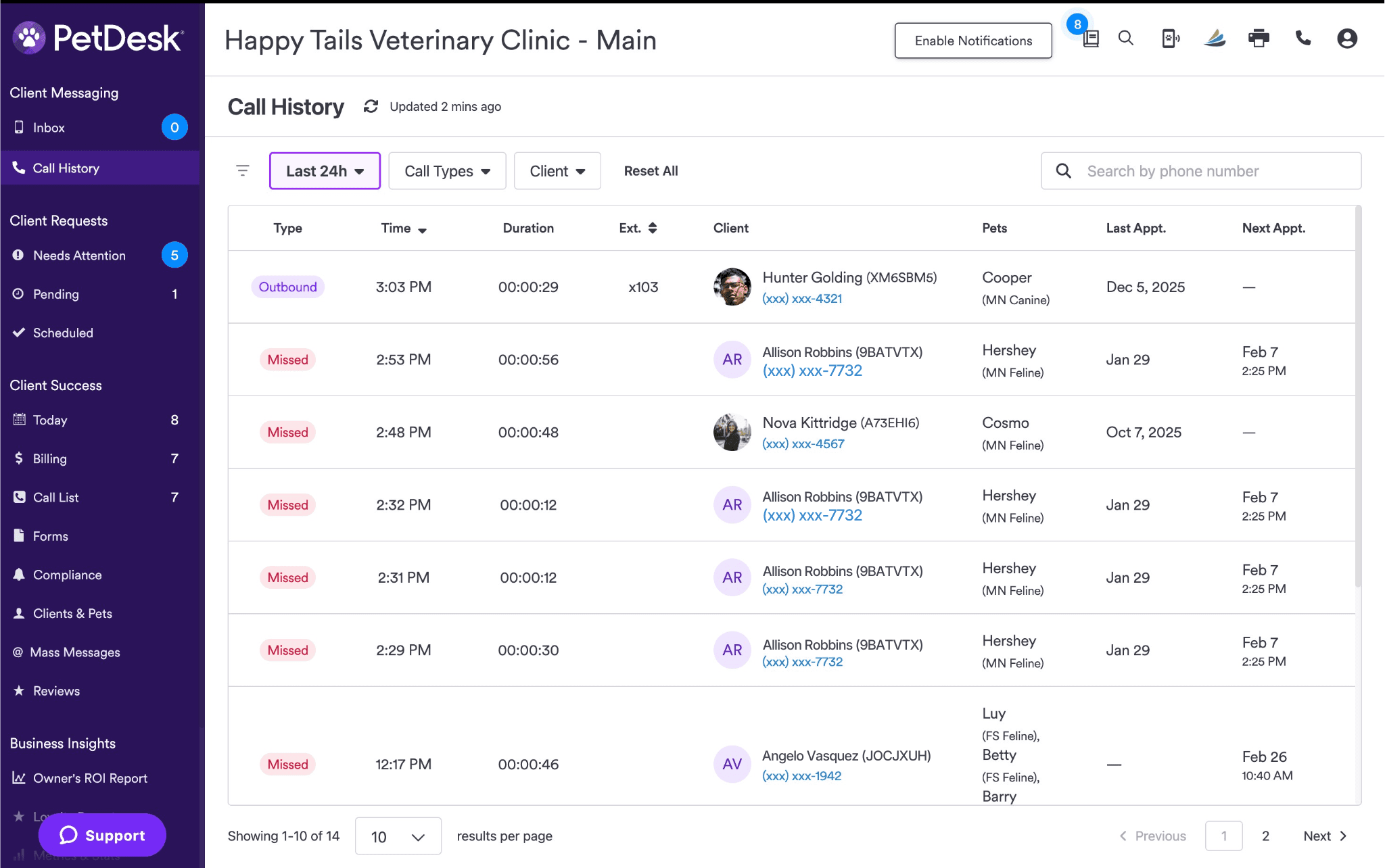
Six months later, Allison decides to call your clinic about her cat Hershey. Even though the new CSR at the front desk had not worked at the clinic 6 months prior, they are still able to see every phone call and text message interaction related to Allison and her cat Hershey. But this isn’t just a smooth experience for Allison and the CSR—with PetDesk Communications, the whole veterinary team is now able to view the full call activity (incoming, outgoing, missed, and returned calls) over the past two years for every client, all in one place. You and your team no longer need to jump between tools to get a complete picture of the daily to-do list.
Simplify your day with the new PetDesk Phones and PetDesk Communications integration
With PetDesk Phones now fully integrated into PetDesk Communications, your team can count on a single source of truth for all veterinary client conversations. Faster context, one-click outreach, complete call visibility, and AI-powered summaries work together to simplify workflows, reduce administrative load, and create a more connected client experience.
You’ll need to purchase both PetDesk Phones and PetDesk Communications to enjoy this exciting integration. If you’re already a PetDesk Phones and PetDesk Communications customer, you’ll be getting this update soon—all clinics will have it enabled by the end of June 2026. Reach out to your customer success manager (CSM) for any questions you may have about this update, or to find out when your clinic will get access.
For existing customers who are interested in this integration but currently only have one of these products, please reach out to your CSM to add on PetDesk Phones and/or PetDesk Communications.
Curious about switching to PetDesk? See the efficiency for yourself when you get a demo or take an online tour.
“The AI call summary has been a big hit. This has been a huge time-saver when it comes to our communication notes and doing callbacks. The auto pop up for who is calling has been helpful as CSRs have been able to get the accounts open before the call has been answered.”
—Chelie Sainz, Office Manager/RVT, Laguna Beach Veterinary Medical Center
Frequently asked questions (FAQ)
Do I need to switch between systems to manage calls and texts?
No. All calls, texts, transcripts, and summaries are managed directly within PetDesk Communications.
Is caller information automatically synced from my PIMS?
Yes. Client and pet details, appointments, and reminders sync from your PIMS and appear when a pet parent calls.
Can AI-generated call summaries be edited?
Absolutely. You can review, edit, and then sync summaries back to your PIMS.
What if I want to respond via text instead of phone?
With one click, you can begin a two-way text message right from the call summary or client profile.
I’m a current PetDesk customer. How do I get this upgraded experience?
There's nothing you need to do if you currently have both PetDesk Phones and PetDesk Communications. All existing customers with both products will have access by the end of June 2026. If you do not currently have both PetDesk Phones and PetDesk Communications and are interested in adding on either one, reach out to your CSM to learn more.
A phone system that talks to your practice data
With PetDesk Phones, your team sees exactly who is calling and their pet’s history before they even say hello. Our PIMS-integrated VoIP and native hardware cut down on phone time and create a calmer, more efficient reception.